
What Is Image Vectorization? How Does It Work?
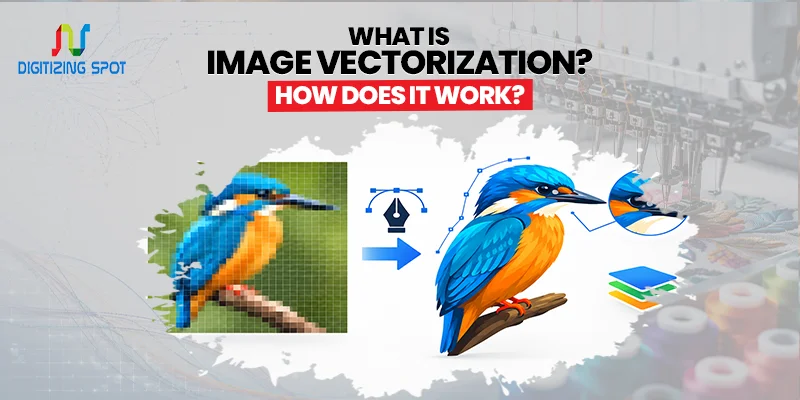
Have you ever enlarged a logo and noticed that it looks blurry? That happens because most images are made of pixels. When you make them larger, those pixels become visible. Image vectorization solves this problem. It changes a pixel-based image into a vector graphic.
A vector file can be resized without making the artwork blurry. This makes it useful for logos, printing, branding, patches, and many other projects. But how does image vectorization work? Let’s look at it in simple terms.
What Is Image Vectorization?
Image vectorization is the process of converting a raster image into a vector file. Raster images are made from small pixels. JPG, PNG, and GIF are common raster formats. If you want clean, embroidery-ready designs, consider our custom digitizing service.
When you enlarge a raster image too much, it can lose its sharpness. Vector graphics work in a different way. They use lines, curves, shapes, and mathematical paths. Common vector formats include AI, EPS, and SVG. The biggest benefit is easy to see. You can resize vector artwork without losing its sharp edges.
Raster Images vs Vector Images
Raster and vector images are built differently. A raster image is made from pixels. Photos are a common example. If you zoom in on a photo, you may see small squares. These are the pixels that make up the image.
A vector image uses paths and shapes instead. These paths create lines and curves. They can be resized without becoming pixelated. For example, a small JPG logo may look fine on a website. But the same logo may look blurry on a large banner. A vector version can be used for both sizes while keeping the logo clear.
Order Your Custom Patch Now!
How Does Image Vectorization Work?
The process starts with a raster image. A designer first checks the artwork. They look at its shapes, colors, lines, and details. The designer then creates paths around the main parts of the image. If you want sharp, scalable artwork for printing, consider our vector conversion service.
These paths replace the original pixel-based shapes. Curves and lines are adjusted to match the original artwork. The correct colors are then added to each section.
The artwork is checked again after the main tracing is complete. Extra points and rough edges are removed. The final vector file is then saved in the required format. Professional vectorization often needs manual editing. This is especially true for detailed or low-quality artwork.
Why Is Image Vectorization Important?
Vectorization gives you more freedom when using your artwork. A logo may be needed on a website today and a large sign tomorrow. Using a raster image for both may cause quality problems.
A vector file can be resized for different uses. You can use the same artwork for business cards, signs, packaging, clothing, and websites. This can also save time when preparing files for different projects.
What Images Can Be Vectorized?
Many types of artwork can be vectorized. Business logos are one of the most common examples. Icons, badges, drawings, symbols, and illustrations can also be converted. However, not every image is suitable for vectorization.
A detailed photograph may contain thousands of colors and tiny details. Turning such a photo into a vector may not be practical. Simple artwork with clear shapes is usually easier to convert. A professional designer can check your image before starting the work.
What Is Manual Vectorization?
Manual vectorization means a designer recreates the artwork by hand using design software. The designer traces the shapes and creates clean paths. They can also adjust curves, lines, and colors during the process.
This gives the designer more control over the final result. Manual vectorization is useful for detailed logos and artwork. It is also helpful when the original image is small or blurry. Instead of simply copying the pixels, the designer rebuilds the artwork as a clean vector file.
What Is Automatic Vectorization?
Automatic vectorization uses software to convert an image into vector paths. It can work well for simple designs. For example, a basic logo with a few solid colors may convert quickly. If you want vibrant designs for custom apparel, consider our DTF Transfers Service.
However, automatic tools can create unwanted points and rough shapes. They may also change some colors or miss small details. That is why professional vector services often review the artwork after automatic conversion. Software can save time, but human checking can help produce a cleaner file.
Where Are Vector Files Used?
Vector artwork is used in many types of projects. Businesses use vector logos for branding and marketing materials. Print shops often request vector files for professional printing.
Vector artwork can also be used for signs, packaging, stickers, and labels. It is useful for T-shirts and other apparel projects as well. Custom patch companies may also need vector artwork for production. If your artwork will be used in different sizes, a vector file can make the process easier.
Common Vector File Formats
Different projects may need different vector formats.
- AI is the native file format used by Adobe Illustrator.
- EPS is commonly used for printing and professional design work.
- SVG is widely used for websites and digital graphics.
- PDF can also contain vector artwork if it was created correctly.
Before ordering vector conversion, ask which format you need. This can help you avoid delays later.
What Makes a Good Vector File?
A good vector file should have clean lines. The curves should look smooth and natural. Shapes should be properly aligned. Colors should also match the original artwork as closely as possible.
Unnecessary points should be removed from the design. The file should also be easy to edit when changes are needed. A poorly converted file may have rough edges or unwanted shapes. These problems can become more obvious when the artwork is printed at a large size.
Need Help To Create Custom Patch Right Now!
Does Vectorization Improve Image Quality?
Vectorization can make artwork scalable. However, it does not magically restore missing image details. For example, a very small and blurry logo may need to be recreated by a designer.
The designer can use the original image as a reference. They can rebuild the shapes and details as vector paths. The result can be much more useful for printing and production. The final quality depends on the original artwork and the skill used during conversion.
How Much Does Vectorization Cost?
Vector conversion prices can vary. The main factor is the complexity of the artwork. A simple logo may take less time than a detailed illustration.
The number of colors can also affect the work required. Poor-quality artwork may need more manual editing. Because of these differences, many vector services provide a quote after reviewing the artwork.
Send your image and explain how you plan to use it. This allows the service provider to understand your requirements before giving you a price.
Conclusion
Image vectorization changes raster artwork into scalable vector graphics. Raster images use pixels, while vector files use paths, shapes, and curves. This makes vector files useful for many printing and design projects.
A vector logo can be used at different sizes without becoming pixelated. It can work for websites, business cards, signs, packaging, apparel, and patches. If you have a low-resolution logo or image, vector conversion may be the solution you need. A professional vectorization service can recreate your artwork into a clean and usable file.
Get A Custom Quote
Frequently Asked Questions
It converts a raster image into a vector graphic.
It lets you resize artwork without losing sharpness.
It is artwork made with paths, shapes, and curves.
Yes, JPG images can be converted into vector files.
Yes, suitable PNG artwork can be converted.
AI, EPS, and SVG are common vector formats.
It can provide cleaner results for detailed artwork.
They are used for logos, printing, apparel, signs, and patches.
It can recreate artwork as clean vector paths but does not restore lost photo details.
The cost depends on the artwork's complexity and details.
