
Raster vs Vector: What Are the Key Differences?
Have you ever tried to resize a logo and ended up with a blurry, low-quality image? Or sent your artwork to a printer only to hear that they need a vector file before they can start the job? You are not alone. Many businesses, designers, and beginners struggle with this. They often don’t know the difference between raster and vector graphics. The file type you choose can make a big difference in how your design looks and performs.
A wrong format can lead to blurry prints, production delays, and extra editing work. In this guide, we’ll explain raster and vector images in simple terms. We’ll show where each type works best and help you choose the right one for your project. This guide will help you make smart choices for your brand logo, custom clothing, promotional items, or embroidery.
What Is a Raster Image?
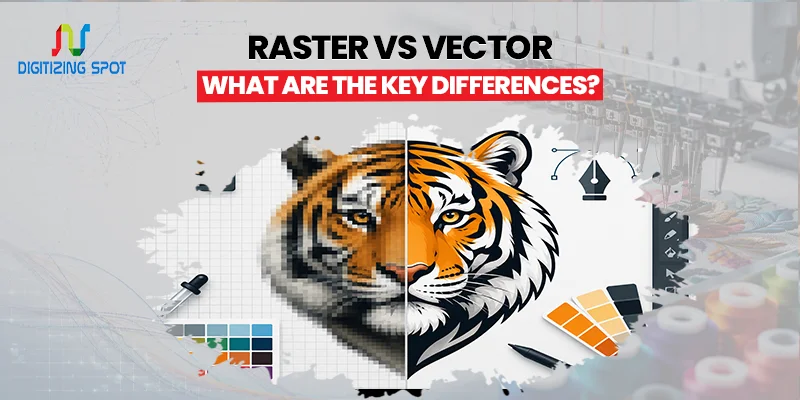
A raster image is made from thousands or even millions of tiny squares called pixels. Each pixel holds a specific color, and together they create the complete picture. If you need accurate color separations for clean, high-quality screen printing, consider our AI Color Separation Service.
Most photos taken with a smartphone or digital camera are raster images. They capture fine details, smooth color changes, and realistic textures. This makes them great for photography. Common raster file formats include JPG, PNG, GIF, TIFF, and BMP.
Raster images work well on websites, social media, and digital displays. However, they have one major limitation. If you enlarge them too much, the pixels become visible, and the image starts to look blurry or blocky.
What Is a Vector Image?
A vector image is created using mathematical paths instead of pixels. These paths tell the computer where lines, curves, and shapes should appear. Because vectors use math instead of fixed pixels, they can be resized to almost any size without losing quality. A vector logo looks just as sharp on a business card as it does on a billboard.
Common vector file formats include AI, EPS, SVG, and PDF. Vector graphics are perfect for logos, illustrations, signs, embroidery, laser engraving, vinyl cutting, and professional printing.
Order Your Custom Patch Now!
Raster vs. Vector: The Biggest Difference
The biggest difference is how each image is built. Raster images are made from pixels, while vector images are made from paths. Pixels have a fixed size. When you enlarge a raster image, the computer stretches those pixels, causing blurry edges.
Vector graphics redraw the paths every time they change size. This keeps the artwork smooth and clear no matter how large or small it becomes. This single difference affects image quality, editing, file size, and printing.
Image Quality Comparison
Image quality is often the first thing people notice. Raster images are great for detailed photos. They capture shadows, textures, and natural color changes well. If you only have a JPG logo or image, consider our JPEG to AI Conversion Service for clean, scalable vector files.
Vector graphics are better for artwork with clean lines and solid colors. Logos, icons, badges, and illustrations usually look better as vectors. If your project needs crisp edges at every size, a vector file is usually the better option.
Which File Is Better for Printing?
Printing is one of the biggest reasons people choose vector graphics. Large banners, business signs, uniforms, promotional products, and embroidered items require clean artwork. A blurry logo can affect the entire finished product.
Vector files keep edges sharp even on large prints. They also make it easier for production equipment to cut, engrave, or stitch the design accurately. Raster images can still be printed, but only if they have a high enough resolution. Low-quality images often produce poor print results.
Which File Is Better for Websites?
Both raster and vector images are useful online. Photos usually stay in raster formats like JPG or PNG because they show realistic colors and details. If your artwork requires precise color separation for professional printing, consider our Photoshop Separation Service.
Icons, logos, and simple graphics often use SVG because the file stays sharp on every screen and device. Choosing the correct format helps websites load faster while keeping images clear.
Raster vs. Vector for Logos
If you are creating a logo, vector is almost always the right choice. Your logo can show up on websites, business cards, uniforms, signs, packaging, and promotional items. A vector file lets you resize it for every use without losing quality.
A raster logo might look fine online, but it often becomes blurry when printed on larger items. That is why professional designers usually create logos as vector files from the beginning.
Raster vs. Vector for Embroidery
Embroidery machines do not stitch directly from JPG or PNG files. Before embroidery digitizing begins, clean artwork is needed. Vector files provide digitizers with clear lines and accurate shapes. This helps make the process faster and more precise.
Using a vector file also reduces mistakes and helps create better stitch quality. If you only have a raster logo, converting it into a vector file is usually the first step.
Raster vs. Vector for Screen Printing
Screen printing depends on clean artwork. Vector graphics offer smooth edges and solid colors. This makes them perfect for printing on T-shirts, hoodies, uniforms, and promotional items.
Raster images with low resolution can create rough edges and uneven prints. Many print shops ask customers to provide AI or EPS files before production begins.
Can You Convert Raster to Vector?
Yes, but the results depend on the quality of the original image. Programs like Adobe Illustrator have a feature called Image Trace. It automatically turns raster images into vector paths.
Simple logos often convert well. Complex artwork usually needs manual editing to create smooth curves and remove unwanted points. Professional vector artists often redraw logos by hand to produce cleaner files for printing.
Common Raster File Types
Several raster formats are used every day. JPG is the most common choice for photos because it keeps file sizes small. PNG supports transparent backgrounds, making it useful for logos displayed online.
TIFF offers high image quality for professional photography and printing. GIF works well for simple graphics and animations. Each format has its own purpose depending on the project.
Common Vector File Types
Vector graphics also come in several formats. AI is Adobe Illustrator’s main working file. EPS is widely accepted by printers and manufacturers. SVG is commonly used on websites because it scales perfectly. PDF can store both vector and raster artwork, making it useful for sharing designs. Knowing which format your printer or designer needs can save time.
Raster vs Vector: Which Should You Choose?
The answer depends on your project. If you are editing photos, creating digital artwork, or sharing images online, raster files are often the best option. If you’re designing logos, signs, apparel, promotional items, decals, or embroidery, use vector graphics. They’re often the best choice. Choosing the correct format early helps avoid delays later.
Need Help To Create Custom Patch Right Now!
Common Mistakes to Avoid
Many people assume that changing a JPG into an AI file automatically creates a vector. It does not. Simply saving a raster image with a new extension will not change how the artwork is built.
Another common mistake is using low-resolution logos for printing. Always check whether your artwork is actually vector before sending it to production. Doing so can prevent expensive reprints and production delays.
Why Professional Vector Conversion Matters
Automatic tracing tools can help, but they do not always create production-ready artwork. Extra points, rough curves, and uneven shapes can cause problems during printing, cutting, or embroidery.
Professional vector artists recreate artwork with clean lines, smooth curves, and organized layers. The finished file is easier to edit, easier to print, and ready for professional production.
Conclusion
Understanding raster and vector graphics can help you avoid common design and printing problems. Raster images are great for detailed photos. Vector graphics are great for logos, illustrations, and professional printing.
If your artwork needs to stay sharp at any size, a vector file is the better investment. Need a clean, ready-to-use file without the hassle of edits? Digitizing Spot can help. We offer reliable service, a quick turnaround, and professional results.
Get A Custom Quote
Frequently Asked Questions
Raster images are made of pixels, while vector images are created using mathematical paths that stay sharp at any size.
Vector is better because it can be resized without losing quality.
Yes. A JPG can be converted into a vector file, although complex artwork may need manual editing for the best results.
PNG is a raster image format.
AI, EPS, and PDF vector files are commonly preferred for professional printing.
Vector files produce clean edges and high-quality prints at any size.
No. Enlarging a raster image usually makes it appear blurry or pixelated.
Yes. SVG is a vector format that is commonly used for websites and scalable graphics.
Embroidery machines require digitized files, but vector artwork provides the best starting point for digitizing.
Digitizing Spot offers accurate vector conversion services with fast turnaround times and a free quote for every project.
