
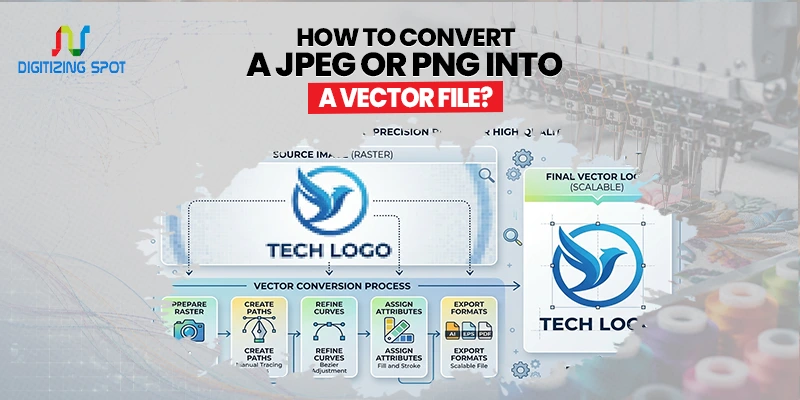
How to Convert a JPEG or PNG into a Vector File?
Have you ever tried to print a logo from a JPEG or PNG file, only to see blurry edges and poor image quality? This is a common problem for businesses, designers, and brand owners. Raster images like JPEG and PNG are made of pixels, which means they lose quality when enlarged. This can cause problems when you need artwork for signs, banners, embroidery, screen printing, or promotional items.
By converting your JPEG or PNG into a vector file, you can create artwork that stays sharp at any size. Vector files are clean, scalable, and ready for professional production. In the next 5 minutes, you’ll learn what vector files are, why they matter, and how to convert your images the right way.
What Is a Vector File?
A vector file is a type of graphic that uses paths, lines, curves, and shapes instead of pixels. Unlike JPEG and PNG images, vector files can be resized without losing quality. Common vector file formats include:
- AI
- EPS
- SVG
Vector graphics use mathematical paths, so they remain sharp on both business cards and large billboards. If you need clean, print-ready color layers for screen printing, consider our AI Color Separation service.
Order Your Custom Patch Now!
What Is the Difference Between JPEG, PNG, and Vector Files?
Understanding the difference helps you choose the right file format for your project. JPEG files are raster images made of pixels. They are commonly used for photos and web images. While they offer small file sizes, they lose quality when enlarged.
PNG files are also raster images. They support transparent backgrounds, making them popular for logos and website graphics. However, they still become pixelated when scaled up.
Vector files are created using paths rather than pixels. They can be resized to any dimension without losing sharpness. This makes them ideal for printing, branding, and production work. If your logo is just a JPEG or PNG, changing it to a vector format can make it more useful for professional needs.
Why Convert a JPEG or PNG into a Vector File?
There are many reasons why businesses and designers choose vector files.
Better Print Quality: Large-format printing requires sharp artwork. Vector files keep edges clean and clear regardless of size.
Easy Resizing: You can enlarge or reduce a vector logo without affecting image quality.
Professional Appearance: Vector artwork looks clean and polished on marketing materials, uniforms, signs, and packaging.
Production Ready: Many printing and manufacturing processes require vector artwork before production can begin.
Easier Editing: Text, shapes, and colors can be adjusted more easily in vector design software.
How Does Vector Conversion Work?
Vector conversion is the process of recreating a raster image using vector paths. During conversion, software or a graphic artist traces the shapes, outlines, and colors from the original image. The result is a scalable file that maintains a clean appearance at any size.
Simple logos with solid colors are usually easier to convert. Complex images with gradients, shadows, and fine details usually need manual work for the best results. If you want to turn a pixel-based image into a scalable vector file, consider our JPEG to AI Conversion service.
Methods to Convert JPEG or PNG into a Vector File
There are several ways to convert an image into a vector file.
Method 1: Use Adobe Illustrator
Adobe Illustrator is one of the most popular tools for vector conversion. Start by opening your JPEG or PNG image in Illustrator. Select the image and use the Image Trace feature. The software will automatically detect shapes and convert them into vector paths.
After tracing, use the Expand option to turn the traced image into editable vector artwork. You can then clean up any unwanted points and save the file in AI, EPS, or SVG format. This method works well for simple logos and graphics.
Method 2: Use CorelDRAW
CorelDRAW includes a feature called PowerTRACE. Import your image and run the tracing tool. Adjust the settings until the artwork looks clean. Once completed, save the file as a vector format. Many sign shops and print businesses use CorelDRAW because of its vector editing capabilities.
Click Here to Know More About What is CorelDRAW |
Method 3: Use Online Vector Conversion Tools
Several online tools offer automatic vector conversion. Users simply upload a JPEG or PNG file and download a vector version. While this option is quick, the results may not always be accurate. Automatic tools often struggle with low-quality images and complex logos. Additional editing may still be required. If you need accurate color separations for complex artwork and high-quality printing, consider our Photoshop Separation service.
Method 4: Professional Manual Vector Redrawing
For the highest quality results, many businesses choose professional vector conversion services. Instead of relying entirely on software, experienced artists manually redraw the artwork. This creates cleaner lines, smoother curves, and more accurate details.
Manual vector conversion is especially useful for:
- Low-resolution logos
- Old artwork
- Complex graphics
- Business branding materials
- Print-ready production files
Common Problems During Vector Conversion
Problem
Description
When Should You Use a Professional Vector Conversion Service?
Many online tools promise instant results, but they often leave imperfections behind. Professional vector conversion may be the better option when:
- Your logo is blurry
- The artwork contains fine details
- You need print-ready files
- Brand accuracy is important
- You need fast turnaround
A professional artist can recreate the artwork with precision while preserving the original design. This saves time, reduces production issues, and ensures a polished final product.
Need Help To Create Custom Patch Right Now!
Industries That Commonly Use Vector Files
Vector artwork is used across many industries. Marketing agencies use vector logos for branding campaigns. Screen printers rely on vector files for apparel decoration.
Embroidery digitizers often use vector artwork as a starting point for creating embroidery files. Sign makers use vector graphics for large-format printing.
Promotional product companies use vector files for custom merchandise and branded items. Because vector files are flexible and scalable, they have become the industry standard for professional graphics.
Why Choose Digitizing Spot for Vector Conversion?
At Digitizing Spot, we help businesses, brands, and creators turn JPEG and PNG images into clear vector files. Our team focuses on accuracy, quality, and quick turnaround times. Every design is carefully reviewed to ensure sharp lines, clean curves, and professional results.
We provide ready-to-use files for your needs. This includes printing, embroidery, signage, and marketing materials. We also offer free quotes, making it easy to get started without any obligation.
Conclusion
Turning a JPEG or PNG into a vector file is a great way to boost the quality and flexibility of your artwork. Vector files stay sharp at any size. This makes them great for printing, branding, embroidery, and promotional products. Unlike raster images, they maintain their quality no matter how large you scale them.
Automatic tools can assist with simple designs. However, professional vector conversion usually provides the cleanest and most reliable results. For professional-looking artwork that’s ready for production, choose a well-made vector file.
Need a clean vector version of your logo or artwork? Contact Digitizing Spot today for a fast turnaround and a free quote.
Get A Custom Quote
Frequently Asked Questions
Yes, free tools are available, but professional services usually provide cleaner and more accurate results.
AI, EPS, SVG, and PDF are the most commonly used vector formats.
It improves scalability, but it cannot restore details missing from the original image.
Vector files stay sharp at any size, making them ideal for high-quality printing.
Yes, but manual redrawing may be needed for the best accuracy.
Most vector conversions can be completed within a few hours to one business day.
Yes, vector files keep logos crisp and professional across all sizes.
Adobe Illustrator and CorelDRAW are two of the most popular options.
Yes, but complex photos often require detailed editing and may not retain every detail.
Digitizing Spot offers fast turnaround, high-quality vector conversion, and free quotes.
