
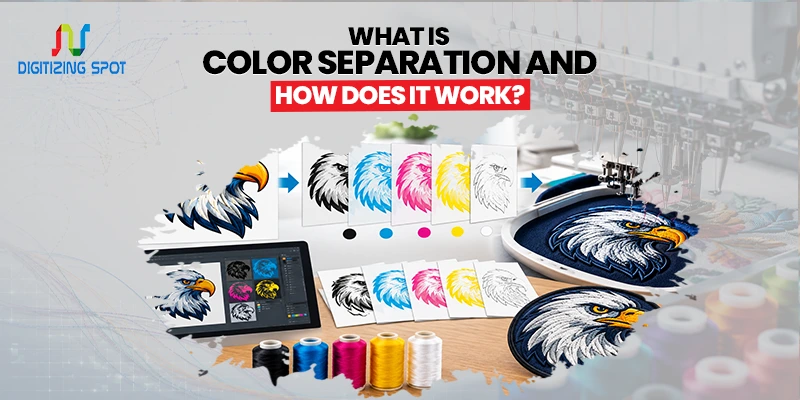
What Is Color Separation and How Does It Work?
Your design may look perfect on screen, but printing it is a different story. Each color must be placed correctly for a clean, sharp result.
Color separation breaks a design into separate color layers, making it easier to print each color in the right place. In the next 5 minutes, we’ll explain how color separation works and why it matters for quality printing.
What Is Color Separation?
Color separation is the process of splitting a design into individual color layers before printing. For example, imagine a logo that uses red, black, white, and blue. Instead of treating the design as one complete image, each color is separated into its own layer. If you want your artwork turned into a clean, embroidery-ready file, consider our custom digitizing service.
The printer can then use these layers to place each color in the right area. When the colors are printed together, they create the final design. This process is especially important for screen printing. It helps printers control each color and make sure the finished product looks close to the original artwork.
Why Is Color Separation Important?
A digital design and a printed design do not work in exactly the same way. Your computer can show thousands or even millions of colors on the screen. A printing process may use a specific number of inks or colors.
Without proper separation, colors can overlap incorrectly. Small details may disappear, and fine lines can become unclear. Poor separation can also cause registration problems. This happens when different color layers do not line up properly.
Good color separation helps reduce these issues. It gives the printer clear information about where each color should go. For businesses, this is especially important when printing logos and branded artwork. A clean and accurate print can help keep your brand image consistent.
Order Your Custom Patch Now!
How Does Color Separation Work?
The process starts with the original artwork. A professional first checks the design, colors, details, and printing method. The artwork is then divided into separate layers based on its colors. If you want to turn a low-quality image into a clear, scalable design, consider our vector conversion service.
Each layer contains the areas that belong to one color. For example, a four-color design may be separated into four layers. One layer may contain the black areas, another the red areas, and so on.
The layers are then checked for gaps, overlaps, and other issues. After the separation is complete, the files can be prepared for the printing process. The exact process may vary depending on the type of printing and the design itself.
Color Separation for Screen Printing
Screen printing is one of the most common uses for color separation. In this process, each color may require its own screen. A design with four main colors may therefore need four separate screens.
Each screen applies one color to the material. The printer places the colors in the correct position and order. Once all colors are printed, they form the complete design.
This is why accurate color separation matters. If one layer is slightly out of place, the finished design may not look right. Proper separation can also help make production more consistent, especially when printing the same design on many shirts or other products.
Spot Color Separation
Spot color separation is often used for designs with a limited number of solid colors. For example, a company logo may use black, white, and one brand color. Each color can be separated into its own layer. If you want vibrant, detailed designs ready for garment printing, consider our DTF transfers service.
This method works well for simple logos, text, and artwork that does not need many shades. Spot colors can also be useful when brand color consistency is important. Using specific colors can help keep the logo looking similar across different printed products.
Process Color Separation
Process color separation is commonly used for artwork with many colors and shades. One common method is CMYK, which stands for cyan, magenta, yellow, and black.
These four colors are printed in controlled amounts to create a wider range of colors. CMYK separation can work well for detailed artwork, photographs, and designs with many color changes. The right method depends on the artwork and the type of printing being used.
What Happens Without Proper Color Separation?
Skipping professional color separation can create several problems. Colors may appear in the wrong places. Small details may be lost. Text can become difficult to read. The printed colors may also look different from the original design.
Another issue is wasted materials. If the artwork is not prepared correctly, a printer may need to produce the job again. This can lead to extra costs and production delays. Preparing the artwork correctly before printing helps reduce these risks.
What Files Are Needed?
The type of file needed depends on the project and printing method. Vector files such as AI, EPS, and PDF are often useful for color separation. They can usually be resized without losing image quality.
High-resolution PNG and JPG files may also work for some projects. If your artwork is low quality, it may need to be cleaned up before the colors can be separated. If you are unsure whether your file is suitable, a professional can review it before starting the project.
Need Help To Create Custom Patch Right Now!
Who Needs Color Separation?
Color separation can be useful for many types of printing projects. Clothing brands may need it for printed shirts and apparel. Sports teams can use it for uniforms and team gear. Businesses may need it for branded workwear, bags, and promotional products.
It is also useful for designers and artists who need to prepare artwork for professional printing. If your design contains multiple colors, small details, or complex artwork, proper separation can make the printing process easier.
Conclusion
Color separation is an important step in preparing artwork for professional printing. It divides a full-color design into separate layers so each color can be printed in the correct place. This helps improve color accuracy, detail, and overall print quality.
From simple business logos to detailed apparel designs, the right separation method depends on the artwork and printing process. If you need professional color separation, Digitizing Spot can help prepare your artwork for production with quality service, fast turnaround, and a free quote.
Get A Custom Quote
Frequently Asked Questions
Color separation is the process of splitting artwork into separate color layers for printing.
It helps printers place each color correctly and produce a clean final design.
Spot color separation divides artwork into specific solid colors, such as red, black, white, or blue.
CMYK separation uses cyan, magenta, yellow, and black to create a wide range of printed colors.
Yes, but the image should have enough resolution for the printing process.
AI, EPS, and PDF files are often useful because they can maintain high image quality.
Yes. Screen printing often requires separate layers or screens for each color.
Turnaround depends on the design, number of colors, and level of detail.
Yes. A logo can usually be separated into individual color layers for printing.
Digitizing Spot offers professional color separation with quality service, fast turnaround, and a free quote.
